Guide
Best Resin for Elegoo Saturn, Mars and Phrozen Sonic Printers
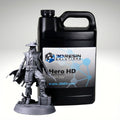
The short answer: If your Elegoo Saturn, Elegoo Mars, Phrozen Sonic or Anycubic Photon uses a 365, 395 or 405 nm light source, HERO HD will run on it, and most consumer LCD printers in these lines use 405 nm. Pick HERO HD for tough gaming minis, RPG Medium Grey for an affordable ABS style resin, and Standard HD for high detail display pieces at a value price. Below are the starting exposure settings we publish for each printer.
How to tell if a resin will work on your printer
Resin compatibility comes down to light. Every resin printer cures resin with a light source at a set wavelength, measured in nanometers (nm). A resin works on your printer when it is formulated to react at that wavelength. Here is how our tabletop resins line up:
- HERO HD supports 365 nm, 395 nm and 405 nm light engines.
- RPG Medium Grey has a UV peak absorption of 405 nm.
- Standard HD Dark Cool Grey has a UV peak absorption of 365 and 405 nm, and Standard HD Flat Grey has a reactive range of 365 to 450 nm.
Before you buy any resin, check the light source wavelength on your printer's spec sheet. If it reads 365, 395 or 405 nm, HERO HD is a match. If it reads 405 nm, all three of our tabletop resins are a match.
Which 3DRS resin to pick
| If you want | Pick | Why |
|---|---|---|
| Minis that survive drops, transport and real gameplay | HERO HD | 30 to 35 percent elongation at break, so thin weapons and fingers flex instead of snapping |
| An affordable, non brittle resin that prints fast | RPG Medium Grey | ABS style, low odor; starting exposure times for each printer are in the tables below |
| High detail display models and scale pieces at a value price | Standard HD | Minimized hazards, no fillers, Shore D 80 for a firm, rigid part |
For a deeper look at how the three compare, read our HERO HD vs RPG vs Standard HD guide.
Starting exposure settings for Elegoo Saturn 4 and Saturn 5
These are the normal exposure starting points from our published settings sheet, at 50 micron layers. Where the sheet gives a range, we show one starting value; adjust 0.1 to 0.2 s as needed and confirm with a calibration print.
| Resin | Normal exposure | Bottom exposure | Bottom layers |
|---|---|---|---|
| HERO HD Merchant Grey | 2.2 s | 30 to 35 s | 6 |
| HERO HD Sienna | 2.2 s | 30 to 40 s | 6 |
| HERO HD Medium Grey | Start at 1.9 s, adjust 0.1 to 0.2 s as needed | 30 to 35 s | 6 |
| RPG Medium Grey | 2.5 s | 45 s | 10 |
| Standard HD Dark Cool Grey | Start at 4.4 s, adjust 0.1 to 0.2 s as needed | 35 to 40 s | 10 |
| Standard HD Flat Grey | Check our resin print settings and exposure times page for current values | ||
Starting exposure settings for Elegoo Saturn 4 Ultra and Saturn 5 Ultra
| Resin | Normal exposure | Bottom exposure | Bottom layers |
|---|---|---|---|
| HERO HD Merchant Grey | 2.2 s | 30 to 35 s | 6 |
| HERO HD Sienna | 2.2 s | 30 to 40 s | 6 |
| HERO HD Medium Grey | Start at 1.9 s, adjust 0.1 to 0.2 s as needed | 30 to 35 s | 6 |
| RPG Medium Grey | 2.5 s | 35 to 45 s | 10 |
| Standard HD Dark Cool Grey | Start at 3.6 s, adjust 0.1 to 0.2 s as needed | 35 to 40 s | 10 |
| Standard HD Flat Grey | Check our resin print settings and exposure times page for current values | ||
Starting exposure settings for Elegoo Mars 4+
| Resin | Normal exposure | Bottom exposure | Bottom layers |
|---|---|---|---|
| HERO HD Merchant Grey | 2.2 s | 30 to 35 s | 6 |
| HERO HD Sienna | 2.2 s | 30 to 40 s | 6 |
| HERO HD Medium Grey | Start at 1.9 s, adjust 0.1 to 0.2 s as needed | 30 to 35 s | 6 |
| RPG Medium Grey | 2.5 s | 45 s | 10 |
| Standard HD Dark Cool Grey | Start at 4.4 s, adjust 0.1 to 0.2 s as needed | 35 to 40 s | 10 |
| Standard HD Flat Grey | Start at 2.6 s, adjust 0.1 to 0.2 s as needed | 35 s | 10 |
Starting exposure settings for Phrozen Sonic Mighty 14K and 16K
| Resin | Normal exposure | Bottom exposure | Bottom layers |
|---|---|---|---|
| HERO HD Merchant Grey | 2.5 s | 30 to 35 s | 6 |
| HERO HD Sienna | 2.5 s | 30 to 40 s | 6 |
| HERO HD Medium Grey | Start at 2.3 s, adjust 0.1 to 0.2 s as needed | 30 to 35 s | 6 |
| RPG Medium Grey | Start at 2.9 s, adjust 0.1 to 0.2 s as needed | 45 s | 10 |
| Standard HD Dark Cool Grey | Start at 4.6 s, adjust 0.1 to 0.2 s as needed | 50 s | 10 |
| Standard HD Flat Grey | Check our resin print settings and exposure times page for current values | ||
Standard HD exposure settings for Phrozen Sonic Mini, Sonic Mega and Anycubic Photon Mono M5s
For these printers we currently publish Standard HD starting points at 50 micron layers:
- Anycubic Photon Mono M5s: Standard HD Flat Grey at a 3.1 s starting normal exposure (adjust 0.1 to 0.2 s as needed), 35 s bottom exposure, 10 bottom layers.
- Phrozen Sonic Mini: Standard HD Flat Grey at a 3.6 s starting normal exposure (adjust 0.1 to 0.2 s as needed), 40 s bottom exposure, 10 bottom layers.
- Phrozen Sonic Mega: Standard HD Flat Grey at a 3.6 s starting normal exposure, and Standard HD Dark Cool Grey at a 4.6 s starting normal exposure. Adjust 0.1 to 0.2 s as needed.
Running HERO HD or RPG on one of these, or on another Anycubic Photon model? Start near the closest printer above with a similar screen, then dial it in with the calibration test below.
Dial it in on your own machine
These numbers are starting points, not final answers. Firmware, room temperature, model size, support settings and resin color all change the result. Our full sheet, with lift distances and speeds, lives on our resin print settings and exposure times page. Print our free Starship or Chip calibration test and lower your exposure to the shortest time that still prints all 11 hammers. That gives you sharp detail without weak layers.
After the print
Clean off uncured resin with high purity IPA or Rhino Resin Cleaner, then let the part dry. HERO HD cures with UV or heat. For heat, use 215 to 275°F for a minimum of one hour. We typically recommend starting with a large countertop oven from any big box store, ideally with an air fryer feature, because the moving air heats parts evenly. Our HERO HD curing guide walks through every step. RPG and Standard HD use a 10 minute light cure.
Made in the USA, shipped fast
We make every one of these resins in the USA, in an ISO 9001:2015 certified facility. Free Standard shipping applies on orders of $44 and up in the lower 48. Browse all tabletop resins to compare colors.
FAQ
Will HERO HD work on my Elegoo Saturn?
HERO HD supports 365, 395 and 405 nm light engines. If your Saturn uses one of those wavelengths, it will work. Start with the settings above and calibrate.
What resin should I use on a Phrozen Sonic Mighty 16K?
For gaming minis that get handled, HERO HD. For budget friendly minis, RPG Medium Grey. For detailed display models, Standard HD. Starting settings for all three are in the table above.
Do these settings work on the Anycubic Photon Mono?
We publish Standard HD Flat Grey settings for the Photon Mono M5s. For other Photon models, start from a similar printer above and run the Starship test.
Why are my prints failing with the settings above?
Shake the resin well, keep it between 18 and 28°C while printing, and check your build plate leveling. If prints still fail, email us at info@3dresinsolutions.com with your printer, resin and settings.
The 3DRS Team